PHOTO tab 📷

Last update: Friday, Oct 02, 2026
Discover the best of AFP's photo production and that of its partners. In this article :
1. Photo display order
The displayed date always corresponds to the document's creation date, whether it's the date of writing for an article or the snapshot date for a photo.
In the news feed, documents are sorted based on their publication/validation date and time.
This explains why a photo taken 9 minutes ago might appear after one from 2 hours ago if the latter was approved by the editorial team later.
For news-related purposes, like commemorating an anniversary, marking a death, or aligning with a specific theme (e.g., the example below from 2014), an archived photo can be reintroduced into the news feed, where it will seamlessly integrate with recent photos in the news feed mosaic.

However, in a search result, the original photo will be prominently listed and indexed at its capture year, (2014 in this case).
2. Topshots & Essentials
TOPSHOTS : AFP's editorial team daily selects the best photos, known as "topshots."
ESSENTIALS : This filter allows you to access a curated selection of AFP’s most important news photos, chosen by AFP editors to provide quick access to the day’s key images.
While Topshots highlights exceptional photos for their visual quality and storytelling power, Essentials focuses on the images that are indispensable for understanding current events, offering a complementary selection of AFP’s best photo coverage.
Enabling the "topshots" or "essentials" filter in the "Photos" tab :
If you enter this word by itself, you will be directed to the "Photos" tab of the news feed, with the "topshots" filter automatically selected. If you type this word together with one or more other terms, you will be directed to the result corresponding to the search using these other terms, with the "topshots" panel automatically activated.
3. "Collections" facet
All the pictures of the photo partners are available on AFP News (real time and full archive).
The 'Collections' facet allows you to display only AFP content or photos from a specific partner. It updates itself based on search results, showing only the names of providers (including partners) for which photos are available for the current search.
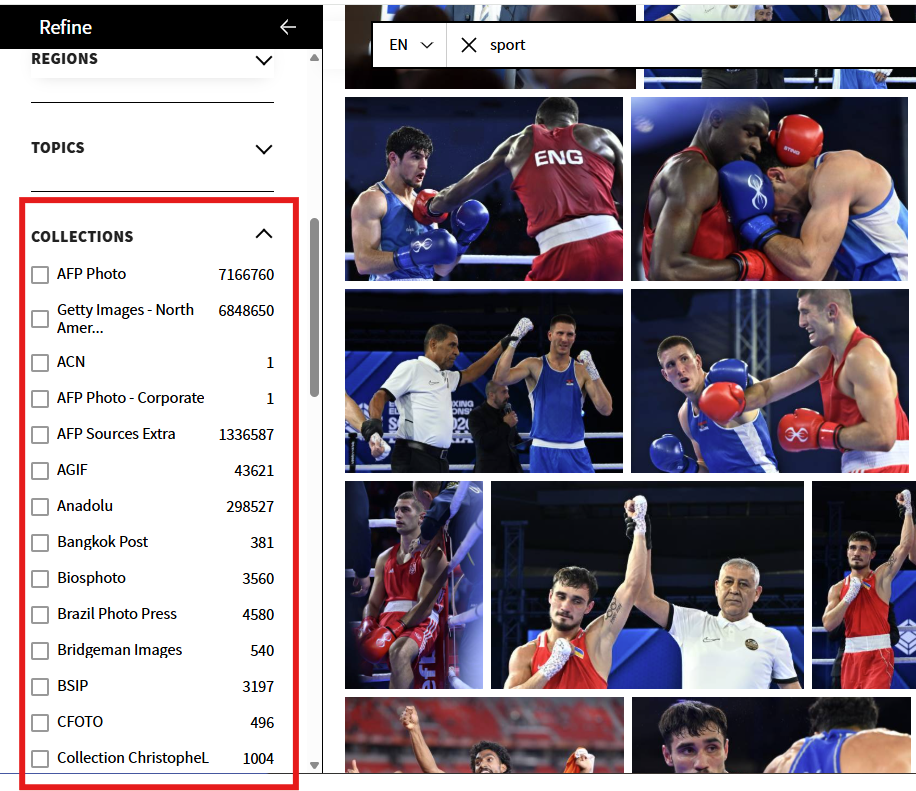
Partners' names are listed in alphabetical order; however, "AFP Photo" (which combines search results from AFP-PH and GettyNA) and "AFP Sources Extra" remain pinned to the top of the list for permanent display.
4. Aspect ratio and image technique
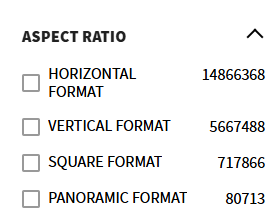
The facet "aspect ratio" allows you to limit the search results according to the desired format : horizontal, vertical, square, or panoramic. This feature is available for all photos available on the platform (AFP and partners).
The "Image Description" facet allows you to filter photographs according to the techniques used. These may include, for example, a dominant color, a specific shooting angle, or a particular photographic composition. This metadata is manually added by AFP teams and only applies to AFP photos.
5. [NEW✨] AFP Photo Selection
The AFP Photo Selection page features a curated selection of photo content handpicked by AFP photo editors.
To access this view:
Uncheck “Show the photo wire” toggle on the Photo page. To return to the classic feed, simply re-check “Show the photo wire”.
On the AFP Photo Selection page view, you have access to the very best of AFP photo content, organized into folders:
AFP’s Top Photos: the most striking images of the moment (Topshots, sports, unusual photos, photos of the week)
Highlights: powerful images, rare access, unusual angles
Stock Images: photos classified by major themes
Portraits: leading figures in the news (including AFP studio portraits)
6. Photo display adjustment
To enhance your browsing experience, you can adjust the size of the photo thumbnails displayed in the mosaic using an interactive slider :
Need an overview ? Reduce the size of the photos by clicking on ‘-’ or by moving the blue slider to the left to increase the number of images displayed on the screen.
Want to see the details ? Enlarge photo thumbnails by clicking on ‘+’ or moving the slider to the right for better visibility.
The number of zoom levels depends on the size of your screen and the zoom setting of your browser.
7. Grouping together by album
This feature allows you to present photos grouped together into albums. In order not to lose the news feed when multiple photos are validated, group photos together on the same subject. In the mosaic view, a single photo thumbnail represents the entire album, providing a more compact and streamlined overview.

An album groups together photos that share :
The same trislug (Example : England – session – training)
The same event, over a time frame from (D-1 to 12.00 am) to (D+1 to 12.00 am) where D is the day currently being consulted in the feed. (If you scroll down, D is not necessarily the current day.)
Photos which cannot be grouped together into an album are displayed alone.
8. [New ✨] Photo caption translation
When viewing a photo, the caption is displayed in English by default. To support you, AFP has developed a dedicated tool that allows you to translate captions into 17 languages:
English
French
German
Greek
Hungarian
Indonesian
Italian
Japanese
Korean
Polish
Portuguese
Simplified Chinese
Spanish
Thai
Turkish
Vietnamese
Click on the “Translate caption” button.
In the popup that opens just below, select the language of your choice.
👂Share your thoughts on your AFP News experience to help us improve it. Your opinion matters.


Formats éditoriaux 🧩
Written by Marie Abraham.